
The Refresh Cycle Question
One of the most consequential IT decisions a business makes isn’t which equipment to buy. It’s how long to keep it. The standard three-year refresh cycle that many organisations follow was established decades ago when technology advanced rapidly enough to justify frequent replacement. But does that timeline still make sense in an era where hardware performance improvements have slowed and sustainability concerns have intensified?
The answer, like most things in IT management, is “it depends.” But for many organisations, the default three-year cycle is leaving money on the table and generating unnecessary electronic waste. Understanding what drives equipment lifespan helps you make better decisions for your specific situation.
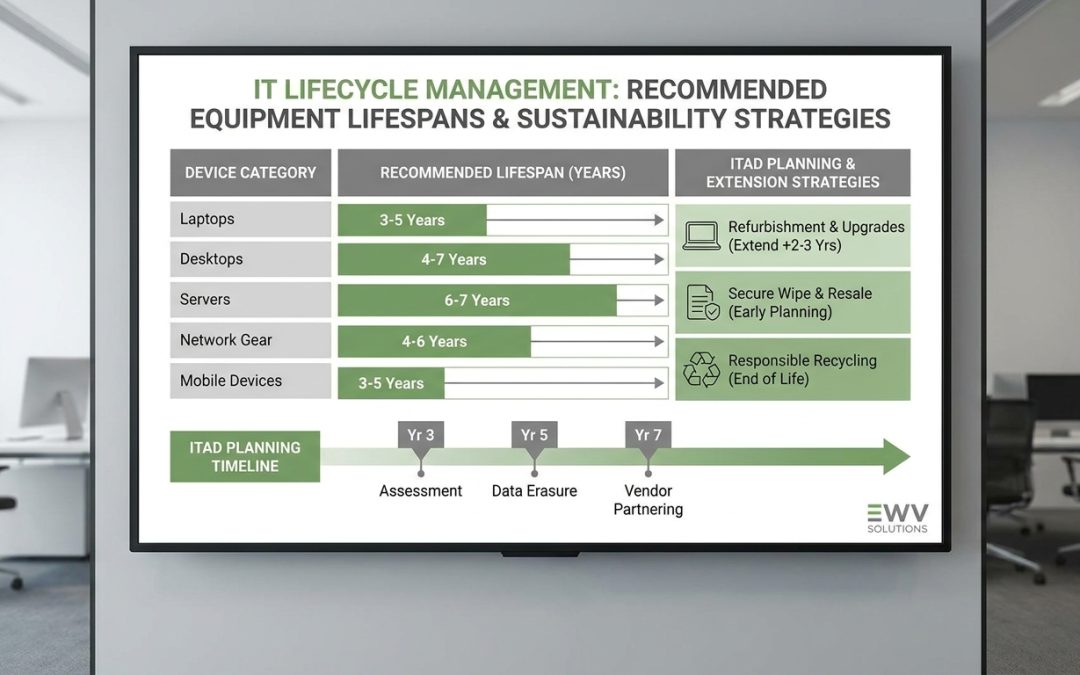
Typical Lifespans by Equipment Category
Laptops are the most common business IT asset and the one most frequently replaced. Consumer-grade laptops typically show noticeable degradation after 2-3 years, with battery capacity declining, hinges loosening, and performance struggling with updated software. Business-class laptops from major manufacturers are engineered differently, with better materials, more robust construction, and replaceable components. A well-maintained business laptop can comfortably serve for 5-7 years, with battery replacement around the 3-4 year mark.
Desktop computers generally last longer than laptops because they face less physical stress, have better cooling, and offer easier component upgrades. A business desktop can remain productive for 6-8 years, especially if RAM and storage are upgraded at the midpoint. Desktops are particularly good candidates for extended lifespans because individual components can be swapped without replacing the entire system.
Monitors have the longest practical lifespans of any common IT equipment. Modern LCD and LED monitors can easily last 8-12 years with no meaningful degradation for office use. Unless your organisation needs specific features like USB-C connectivity or higher resolution for design work, there’s rarely a performance reason to replace a functioning monitor.
Servers typically operate on 5-7 year cycles in most organisations, though this varies significantly based on workload requirements. Servers running compute-intensive workloads may justify more frequent replacement due to energy efficiency improvements, while file servers, print servers, and light-duty infrastructure can run much longer.
Laptops (business-class): 5-7 years with mid-life battery replacement
Desktops: 6-8 years with RAM/storage upgrade at year 3-4
Monitors: 8-12 years for standard office use
Servers: 5-7 years depending on workload intensity
Network switches: 7-10 years
Printers (enterprise): 5-8 years
What Actually Determines When to Replace
Several factors should drive the replacement decision, and they don’t all point in the same direction.
Performance adequacy is the most obvious factor. If a device can no longer run the software its user needs at acceptable speed, it’s time to upgrade. But “acceptable speed” is subjective and should be assessed against actual workload requirements rather than benchmark scores. An accountant running spreadsheets and email has different performance needs than a developer compiling code or a designer rendering graphics.
Security support is increasingly the limiting factor for equipment lifespan. When a device’s operating system or firmware no longer receives security updates, continuing to use it on a corporate network creates risk. Windows 10 end-of-support in October 2025 forced many organisations to evaluate whether older hardware could run Windows 11, which has stricter TPM and processor requirements. Hardware that can’t support a currently-patched operating system may need retirement regardless of physical condition.
Reliability and maintenance cost follows a bathtub curve for most IT equipment. Failure rates are slightly elevated during the initial period (manufacturing defects), drop to a low baseline during the middle of the equipment’s life, and then begin rising as components wear. The economically optimal replacement point is when the expected cost of failures and repairs starts exceeding the annualised cost of replacement.
Energy efficiency matters most for equipment that runs continuously under load. For laptops and desktops used during business hours, the energy cost difference between a current and five-year-old model is modest. For servers running 24/7, the efficiency gap between generations can be significant enough to justify earlier replacement from both cost and carbon perspectives.
The Problem with Fixed Refresh Cycles
Many organisations default to a fixed refresh cycle, typically three or four years, applied uniformly across all equipment and all users. This approach is administratively simple but financially and environmentally wasteful. It replaces equipment that’s still perfectly functional simply because a calendar date has passed.
A condition-based replacement strategy makes better use of resources. Rather than replacing everything on schedule, equipment is assessed individually based on performance, reliability, security compliance, and user requirements. Devices that are still meeting needs stay in service. Devices that are struggling get replaced, potentially with refurbished equipment that has better specifications than the failing unit.
This approach requires more active asset management than a simple calendar-based schedule, but the tools for condition monitoring, including device management platforms, hardware diagnostics, and user satisfaction surveys, are readily available and often already deployed in organisations that use them for other purposes.
Extending Lifespans Through Maintenance
Simple maintenance practices can add years to IT equipment lifespans. Battery replacement is the single most impactful maintenance action for laptops. A three-year-old laptop with a new battery can feel like a new device. This service typically costs $100-200 and adds 2-3 years of productive mobile use.
Storage upgrades from traditional hard drives to solid-state drives, or from older SATA SSDs to NVMe drives, deliver immediately noticeable performance improvements. For older desktops and laptops, an SSD upgrade is often the most cost-effective way to keep the device feeling responsive.
RAM upgrades address one of the most common performance bottlenecks in ageing equipment. If devices are socketed (not soldered) for RAM, adding memory is straightforward and inexpensive. Going from 8GB to 16GB on a four-year-old laptop can extend its useful life considerably.
Regular software maintenance, including operating system updates, driver updates, and removing accumulated bloatware, keeps equipment running efficiently. Periodic clean OS installations can restore near-new performance to devices that have accumulated years of software changes.
The Environmental Case for Longer Lifespans
From an environmental perspective, extending IT equipment lifespans is one of the highest-impact actions a business can take. Manufacturing represents 70-80% of a laptop’s lifetime carbon footprint, so every additional year of use significantly reduces the annualised environmental impact.
Moving from a three-year to a five-year laptop refresh cycle reduces per-year manufacturing emissions by approximately 40%. Extending to seven years reduces them by over 55%. These are meaningful reductions that can be reported in ESG reporting and contribute to corporate sustainability targets.
The right answer for your organisation depends on balancing performance needs, security requirements, maintenance capacity, and sustainability goals. But for most businesses, the honest answer is that IT equipment should last longer than current replacement cycles allow. The three-year refresh cycle is a legacy of a faster-moving technology era, and reconsidering it is both financially and environmentally sensible.
EWV helps Victorian businesses manage e-waste and IT asset disposal compliantly and sustainably — including collection, certified data destruction, and recycling. Contact us for a free quote.