
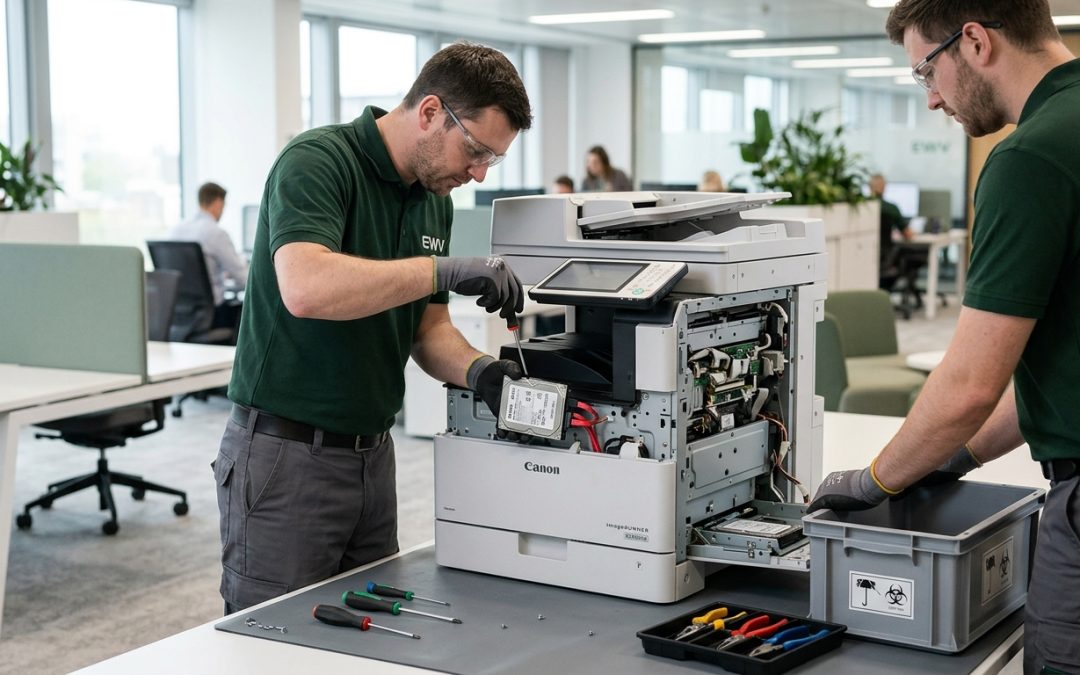
The Storage Devices Most Organisations Forget About
Modern multifunction printers, copiers, and digital scanners contain internal hard drives or solid-state storage that records copies of every document processed through the machine. These devices sit in open office areas, are used by dozens of staff daily, and are frequently returned to leasing companies or disposed of at end of lease without any data destruction. They represent one of the most overlooked data security risks in any organisation.
What Copiers and Printers Store
Digital copiers and multifunction devices (MFDs) use internal storage to manage print queues, store scanned documents, hold fax transmissions, and cache frequently printed documents. Every page that passes through the machine, whether printed, copied, scanned, or faxed, may be stored on the device’s internal drive.
For a busy office copier, this can mean thousands of documents accumulating on the drive over the life of the device. These documents may include financial statements, employee records, medical information, legal documents, contracts, identification documents, and any other material that was printed, copied, or scanned. The drive essentially contains a comprehensive archive of the organisation’s document activity.
Some devices also store address books, email configurations, network credentials, and user authentication data. If the device is connected to the organisation’s network for scan-to-email or scan-to-folder functionality, it may contain network paths, server names, and login credentials.
Why This Risk Is Commonly Overlooked
Several factors contribute to copiers and printers being overlooked in data security planning. These devices are often managed by facilities teams or office managers rather than IT departments, which means they fall outside the scope of IT asset management and disposal policies. They are frequently leased rather than owned, and at the end of the lease, the device is simply collected by the leasing company without any data destruction being performed.
Staff often do not think of a copier as a computer, but modern MFDs are essentially specialised computers with processors, memory, operating systems, and storage drives. The fact that they look like office equipment rather than IT equipment creates a blind spot in many organisations’ security thinking.
Real-World Consequences
The risk is not theoretical. Investigative reports have demonstrated that used copiers purchased from resellers and second-hand markets frequently contain recoverable data from their previous owners. In one widely reported investigation, a news outlet purchased four used copiers from a warehouse and recovered tens of thousands of documents including medical records, police investigation files, building designs, and pay stubs.
For organisations subject to the Privacy Act 1988, the presence of personal information on an unsanitised copier that is returned to a leasing company or sold constitutes a potential data breach. Under the Notifiable Data Breaches scheme, this could trigger notification obligations if the data is subsequently accessed by an unauthorised party.
Types of Storage in Modern Copiers
The storage configuration varies by manufacturer and model. Common configurations include standard hard disk drives (HDDs) ranging from 160GB to 1TB, solid-state drives in newer models, non-volatile RAM that retains data when powered off, and embedded flash storage on the device’s main board.
Some enterprise-grade copiers have multiple storage devices, including a primary drive for document caching and a secondary drive or flash storage for the device’s operating system and configuration data. All storage components must be addressed during data destruction.
Sanitisation Options
Built-in overwrite functions: Many modern copiers include a built-in data overwrite or security erase function accessible through the device’s administration menu. These functions vary in thoroughness. Some perform a single-pass overwrite of the document storage area, while others offer multi-pass options. The effectiveness depends on the specific implementation, and not all manufacturers’ implementations have been independently validated.
Drive removal and destruction: The most thorough approach is to remove the hard drive or storage device from the copier and sanitise or destroy it separately using the same methods applied to any other storage media. This requires knowledge of where the drive is located within the specific device model, as the location varies between manufacturers. Most copier hard drives are standard 2.5-inch SATA drives that can be wiped using standard NIST 800-88 compliant tools or physically destroyed.
Encryption: Some modern copiers offer optional or standard hard drive encryption. When enabled, this encrypts all data stored on the drive, and a factory reset that destroys the encryption key provides cryptographic erasure. However, encryption is often not enabled by default and may not have been activated when the device was initially configured.
Lease Return Considerations
When returning leased copiers, organisations should not assume that the leasing company will handle data destruction. Most standard lease agreements do not include data sanitisation services, and the device may be resold, refurbished, or exported with the data intact.
Before returning any leased device, perform data sanitisation using the device’s built-in overwrite function at minimum, or remove and destroy the hard drive if your lease agreement permits it. Some leasing companies offer data destruction as an add-on service, but verify the specifics of what they provide and whether it meets your compliance requirements.
Review your lease agreement to understand your options. Some agreements allow drive removal, while others require the device to be returned complete. If drive removal is not permitted, insist on documented data destruction before the device leaves your premises.
Prevention Measures
Copier and printer hard drives are a hidden data risk that can be easily managed once organisations recognise that these devices are data storage systems in their own right. Including them in your standard data protection practices eliminates a gap that adversaries and opportunists can exploit.
EWV helps Victorian businesses manage e-waste and IT asset disposal compliantly and sustainably — including collection, certified data destruction, and recycling. Contact us for a free quote.