
Small Media, Significant Risk
SD cards and microSD cards are among the smallest data storage devices in common use, but their size belies the amount of sensitive information they can hold. Modern SDXC cards can store up to 2TB of data, and they are found in cameras, drones, dashcams, medical devices, security cameras, single-board computers, and countless other applications. When these cards reach end of life, the data they contain needs to be properly destroyed.
The small physical size and low cost of SD cards can lead organisations to overlook them during IT asset disposal. This is a mistake that can result in data exposure.
What SD Cards Store
The data on SD cards varies widely depending on the device they were used in. Security cameras and dashcams store video footage that may contain sensitive surveillance material, including images of people and vehicle registration plates. Cameras used in healthcare, legal, or insurance contexts may hold particularly sensitive photographic evidence. Raspberry Pi and similar single-board computers often use microSD cards as their primary storage, holding operating systems, application data, databases, and configuration files including credentials.
Industrial and IoT devices may use SD cards for logging sensor data, storing firmware updates, or holding configuration parameters. Point-of-sale terminals and other commercial devices may store transaction logs on removable media. Even consumer cameras may hold personal photos that raise privacy considerations during disposal.
Why Standard Deletion Is Not Enough
Simply deleting files from an SD card or formatting it does not destroy the underlying data. The FAT or exFAT file system commonly used on SD cards marks the space as available for reuse but does not overwrite the actual data. Free data recovery software can easily retrieve files from a formatted SD card in most cases.
This applies equally to the “quick format” and “full format” options available in most operating systems. While a full format may perform some overwriting on certain systems, it is not a reliable data destruction method for SD cards.
Software-Based Sanitisation
Software wiping tools can be used to overwrite SD cards, following similar principles to NIST 800-88 Clear-level sanitisation. The tool writes data across the entire addressable space of the card, replacing the original content with new patterns.
However, SD cards use flash memory, which means they share the same fundamental challenges as SSDs when it comes to data destruction. Wear levelling, over-provisioning, and bad block management can all leave data remnants in areas that a host-level overwrite cannot reach.
The degree to which these flash-specific issues affect SD cards varies. Consumer-grade SD cards typically have simpler controllers with less aggressive wear levelling than enterprise SSDs, but they still have some over-provisioned space and bad block management capability. Higher-end cards with more sophisticated controllers may have more significant over-provisioning.
For most commercial data on SD cards, a single-pass overwrite of the full card capacity provides reasonable assurance against casual recovery attempts. For sensitive data, additional measures are recommended.
Physical Destruction Methods
Given the low cost of SD cards and the limitations of software-based sanitisation on flash media, physical destruction is often the most practical approach for cards that contained sensitive data.
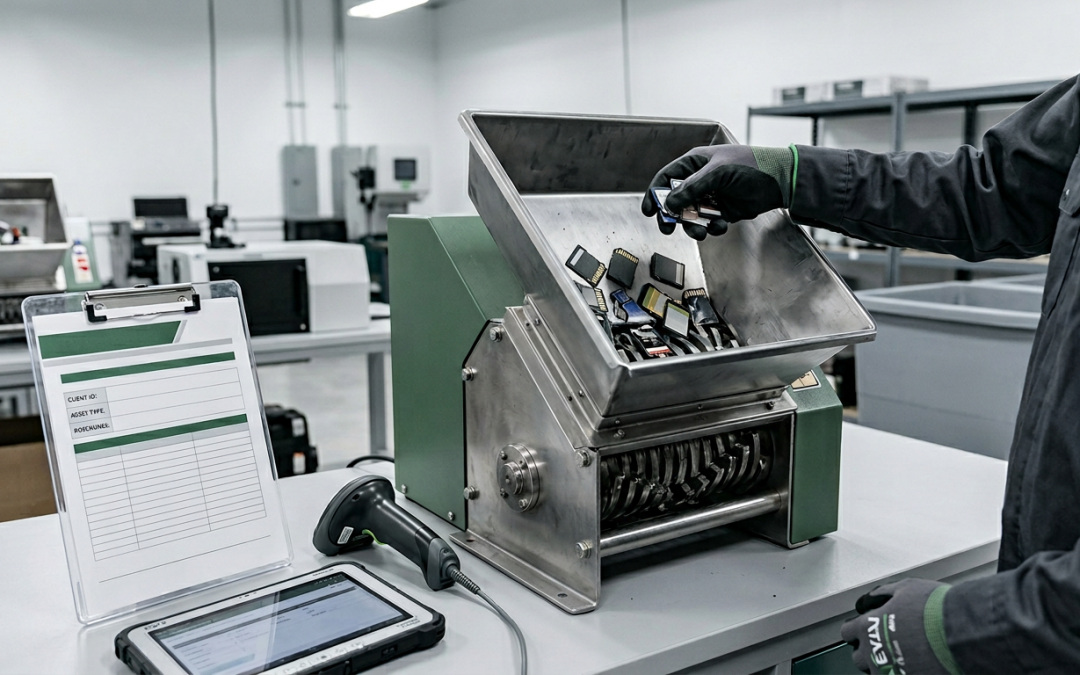
Shredding: Industrial media shredders can process SD cards, reducing them to small fragments. Purpose-built SD card shredders are also available that are designed specifically for the small form factor. The target particle size should be small enough that individual NAND flash chips cannot be recovered intact. For standard commercial data, fragments of 4mm or smaller are generally considered sufficient.
Cutting: For small volumes, cutting the card into multiple pieces with heavy-duty scissors or tin snips, ensuring that cuts pass through the flash memory chips visible on the card’s circuit board, provides a basic level of destruction. This is less thorough than industrial shredding but may be acceptable for lower-sensitivity data.
Incineration: Burning SD cards at high temperature destroys the flash memory completely. However, this must be done at a licensed facility due to the toxic fumes produced by burning electronic components. Backyard burning is not appropriate and may violate environmental regulations.
Crushing: Placing the card in a hydraulic press or similar device can damage the flash chips sufficiently to prevent data recovery. This method is less controlled than shredding but can be effective for small quantities.
MicroSD-Specific Challenges
MicroSD cards present additional challenges due to their extremely small physical size (15mm x 11mm x 1mm). Their tiny form factor means they are easily lost during the collection and disposal process. Individual cards can slip out of devices, fall between equipment, or be overlooked entirely during asset decommissioning.
Organisations should implement specific procedures for identifying and removing microSD cards from all devices during the decommissioning process. Many devices, including phones, tablets, cameras, and IoT equipment, have microSD slots that may not be immediately visible. A checklist of common microSD locations for each device type helps ensure no cards are missed.
Inventory and Tracking
SD cards are often treated as consumables rather than tracked assets, which means organisations may not have accurate records of how many cards are in circulation, where they are, or what data they contain. Before implementing a destruction programme for SD cards, consider conducting an inventory to identify all cards in use across the organisation.
Going forward, including SD and microSD cards in the asset register, particularly those used in security-sensitive applications, improves visibility and ensures they are included in disposal planning.
SD cards are easy to forget about during IT disposal, but the data they contain can be just as sensitive as anything on a hard drive. Including them in your data destruction programme closes a gap that many organisations leave open.
EWV helps Victorian businesses manage e-waste and IT asset disposal compliantly and sustainably — including collection, certified data destruction, and recycling. Contact us for a free quote.