
The Overlooked Data Risk in Every Desk Drawer
USB flash drives are one of the most widely distributed storage devices in any organisation. They are used for file transfers, software installations, presentations, backup copies, and countless other purposes. Over time, organisations accumulate large numbers of USB drives containing everything from innocuous documents to highly sensitive data, and these drives are rarely tracked with the same rigour as laptops or servers.
When USB drives reach end of life or are no longer needed, proper data destruction is essential. The portability that makes USB drives convenient also makes them a significant data loss risk if disposed of without sanitisation.
What USB Drives Typically Contain
The data on USB drives is often a random accumulation of files copied over the drive’s lifetime. A single USB drive may contain confidential business documents, financial spreadsheets, customer data exports, software licence keys, authentication certificates, presentation files with embedded data, database extracts, and personal files. Because USB drives are portable and often shared between users, the range of data they hold can be surprisingly broad.
Even drives that appear empty may contain recoverable data. Files that were deleted from the drive are not actually erased, as only the file system references are removed. The underlying data remains on the flash memory until it is overwritten.
Software-Based Sanitisation
USB flash drives use the same NAND flash memory technology as SSDs, which means they share the same sanitisation challenges: wear levelling, over-provisioning, and bad block management can all leave data remnants that a standard overwrite may not reach.
However, consumer USB drives typically have much simpler controllers than enterprise SSDs, with less aggressive wear levelling and smaller over-provisioned areas. For most practical purposes, a single-pass overwrite of the entire drive capacity using a recognised wiping tool provides adequate sanitisation for commercial data.
Most USB drives do not support the firmware-level sanitise commands (like ATA Secure Erase) that are available on SATA SSDs and NVMe drives. This limits software sanitisation to logical-level overwriting, which is generally sufficient for USB drives but represents a lower level of assurance than firmware-level methods. Under NIST 800-88, this would be classified as Clear-level sanitisation.
For drives that contained particularly sensitive data, software sanitisation alone may not meet your compliance requirements, and physical destruction should be considered.
Physical Destruction Methods
Given the low cost of USB drives, physical destruction is often the most practical and cost-effective approach, particularly for organisations disposing of multiple drives.
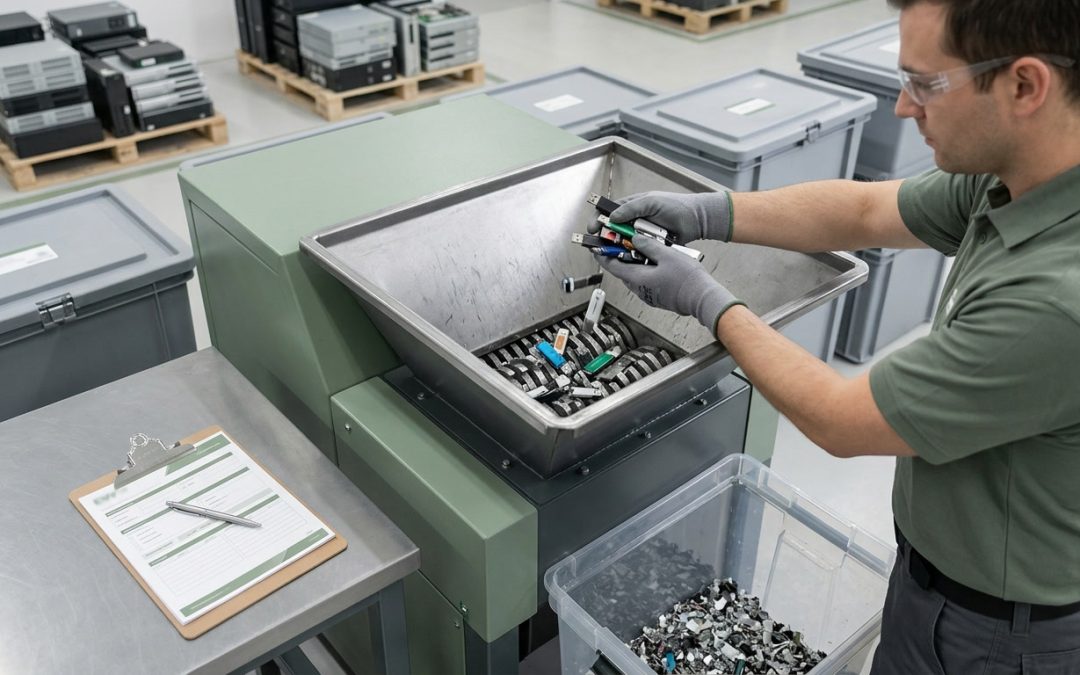
Industrial shredding: Media shredders designed for electronic storage devices can process USB drives along with other small media items. The drive is reduced to fragments, with the target particle size ensuring that the flash memory chips are destroyed beyond the possibility of data recovery.
Disassembly and chip destruction: For small volumes, the plastic casing can be removed to expose the circuit board, and the flash memory chip can be physically damaged with pliers, a hammer, or a drill. While less controlled than industrial shredding, this approach is effective for individual drives when immediate destruction is needed.
Dedicated USB destroyers: Purpose-built USB destruction devices are available that punch, crush, or shred USB drives. These desktop units are convenient for organisations that need to destroy drives on-site as part of a regular workflow.
Encrypted USB Drives
Some USB drives include hardware encryption, either built into the drive controller or through a separate security chip. Encrypted USB drives, when properly implemented, protect data even if the drive falls into the wrong hands. For data destruction purposes, destroying the encryption key through a factory reset or security erase command renders the data cryptographically inaccessible.
However, the same caveats that apply to self-encrypting SSDs apply here: the quality of the encryption implementation varies between manufacturers, and not all encrypted USB drives have been independently validated. For sensitive data, combine cryptographic erasure with either a software overwrite or physical destruction for additional assurance.
Organisational Challenges
The biggest challenge with USB drive data destruction is not the technical process but the organisational one. USB drives are rarely tracked as formal IT assets. They are purchased in bulk, distributed freely, and often end up in desk drawers, bags, and pockets without any central record of their existence or contents.
Establishing basic controls around USB drive usage is the first step toward effective disposal. Consider maintaining a register of USB drives issued for business use, implementing a return policy when drives are no longer needed, providing clearly labelled collection points for drives awaiting destruction, and including USB drives in regular IT asset audits.
For organisations with stricter security requirements, endpoint management tools can monitor and log USB drive connections across the network, providing visibility into which drives are in use and what data they may contain.
Promotional and Event USB Drives
A commonly overlooked category is promotional USB drives, which are frequently distributed at conferences, trade shows, and corporate events. These drives may be preloaded with marketing materials, but recipients often repurpose them for personal or business use. When these drives are eventually discarded, they may contain sensitive data that was never intended for the drive.
Organisations should include promotional and third-party USB drives in their disposal guidance, advising staff to return any USB drives for proper destruction rather than discarding them in general waste.
USB drives may be small and inexpensive, but the data they carry can be valuable and sensitive. A systematic approach to their disposal closes a common gap in organisational data protection.
EWV provides NIST 800-88 certified data destruction for Victorian businesses, covering software-based erasure and physical destruction with full chain-of-custody documentation. Request a quote to discuss your requirements.