
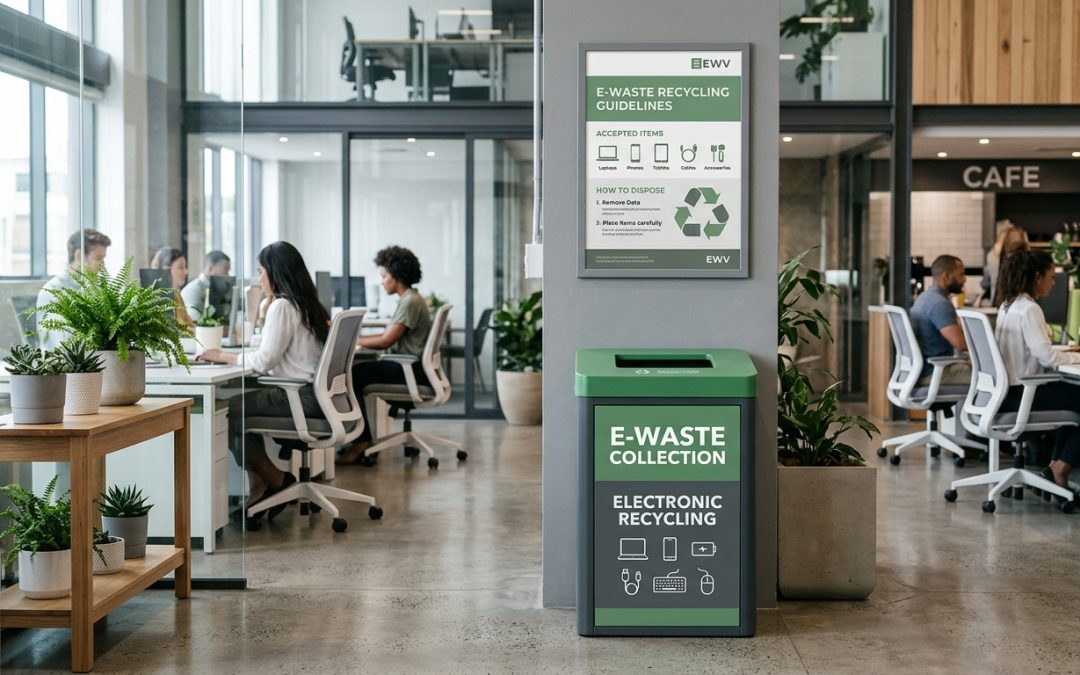
A Simple System That Makes a Big Difference
Most workplaces have general waste bins, recycling bins, and maybe even a compost bin in the kitchen. But very few have a dedicated e-waste collection point. The result is predictable: dead batteries end up in the general waste, old phone chargers get tangled in the recycling, and broken peripherals accumulate in desk drawers for years. Setting up a simple e-waste bin in your workplace solves these problems with minimal effort and cost.
What You Need
The setup is straightforward. You don’t need anything elaborate:
A sturdy bin or container. A medium-sized plastic tub (60-80 litres) works well for most offices. It should be large enough to hold keyboards, cables, and small devices, but not so large that it’s unwieldy to move when it’s time to empty it. Avoid using cardboard boxes because they tear and can’t handle the weight of accumulated electronics.
A separate small container for batteries. Batteries should be collected separately from other e-waste for safety reasons. A small plastic container with a lid (like a 5-litre ice cream tub) works well. Label it clearly as “Batteries Only” and place it next to or on top of the main e-waste bin.
Clear signage. Label the bin prominently with “E-WASTE” and include a brief list of what goes in it and what doesn’t. People are more likely to use it correctly if the guidance is right there at the point of disposal.
E-WASTE BIN – Please place here:
Old cables, chargers, adapters | Dead mice & keyboards | Broken headphones & earbuds | Old USB drives | Retired phones & tablets (wiped) | Small broken electronics
DO NOT place here:
Batteries (use the separate battery container) | Paper, cardboard, food waste | Laptops or computers (return to IT) | Anything with personal/business data still on it
Where to Put It
Location matters for adoption. Place the e-waste bin somewhere visible and accessible that people pass regularly:
Near the main printer or copier. This is a natural spot because people already go there to deal with technology-related tasks. It’s also convenient for depositing empty toner cartridges and old printer cables.
In the kitchen or break room. This is where other waste bins are, so adding an e-waste option here fits existing habits. It’s also a high-traffic area where the bin gets noticed.
Near the IT helpdesk or equipment return area if your office has one. People already associate this location with technology and equipment, making it a natural spot for e-waste disposal.
Avoid placing the bin in a corner, storage room, or anywhere out of the normal workflow. If people have to go out of their way to use it, they won’t.
What Should Go In (and What Shouldn’t)
Good for the bin: cables and chargers of all types, old mice and keyboards, broken headphones and earbuds, USB hubs and adapters, expired or broken USB drives (wiped), old phone cases with electronic components, broken calculators, dead remote controls, small personal electronics (watches, fitness trackers), and empty printer cartridges.
Not for the bin: batteries (separate container), laptops and computers (these should go through IT for data wiping and proper asset disposition), phones and tablets with data still on them (wipe first or return to IT), anything too large for the bin, and any regular waste (paper, food, plastics).
The data rule is important. Any device that has stored data, even a USB drive, should be wiped before going in the bin. For workplace devices, IT should handle data destruction. The e-waste bin is for items that either never stored data (cables, peripherals) or have been cleared.
Managing the Bin
Assign responsibility. Someone needs to own the process. This might be the office manager, a facilities team member, or an enthusiastic volunteer from the sustainability committee. Their role is to monitor the bin, arrange emptying when it’s full, and ensure items are going to the right destination.
Emptying schedule. How often the bin needs emptying depends on office size and e-waste generation. A 20-person office might fill it every 2-3 months. A 200-person office might need monthly emptying. Don’t let it overflow, as this discourages use and creates an untidy impression.
Where to take the contents. Accumulated e-waste can be taken to your local council transfer station (free for most items), included in scheduled commercial e-waste collections, or picked up by a recycler if volumes justify it. The battery container goes to a B-cycle drop-off point, Officeworks, or other battery recycling collection point.
Getting Staff Buy-In
A bin that nobody uses is just furniture. Getting staff to actually use the e-waste bin requires some initial communication:
Announce it. Send a brief email or mention it in a team meeting when the bin is first set up. Explain what it’s for, where it is, and what should and shouldn’t go in it.
Make it visible. A brightly coloured bin with clear signage gets attention. Green is a natural choice given the environmental association, and it visually distinguishes it from other waste bins.
Lead by example. When you clear out your own desk drawer of old cables and dead peripherals, do it publicly by walking over and putting them in the bin. Behaviour spreads through observation.
Share results. Periodically let the team know how much e-waste has been collected and properly recycled. Even a simple “we diverted 15 kg of e-waste from landfill last quarter” in a team update reinforces the value of participation.
Tracking for Sustainability Reporting
If your organisation reports on sustainability or ESG metrics, the e-waste bin provides easy data. Weigh the contents each time you empty it and log the weight. Over time, you’ll build a dataset showing your e-waste diversion rate, which demonstrates concrete environmental action in reports and to stakeholders.
A workplace e-waste bin costs almost nothing to set up but creates an immediate, visible improvement in how your office handles electronic waste. It’s one of those rare changes that’s easy to implement, costs nothing, makes the office tidier, and genuinely helps the environment. There’s no good reason not to have one.
EWV helps Victorian businesses manage e-waste and IT asset disposal compliantly and sustainably — including collection, certified data destruction, and recycling. Contact us for a free quote.